Figure 1
This server allows to interactively browse and retrieve the relationships between allergens and symptoms (HPO terms and allergen-specific symptoms) and MESH pathological terms generated in:
Take a look at that publication for detailed information on the contents of this server and how these relationships were obtained. Please cite that reference when reporting any data, result or figure obtained from this server.
The access to this server is free to everyone.
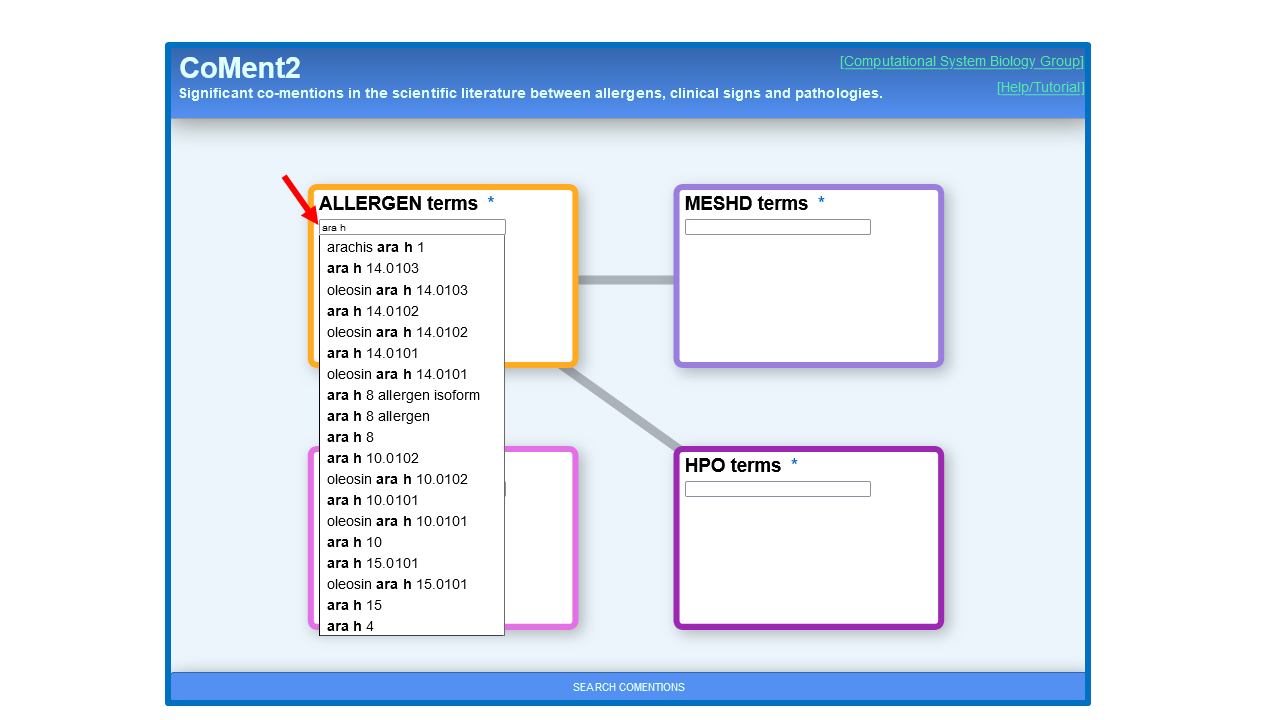
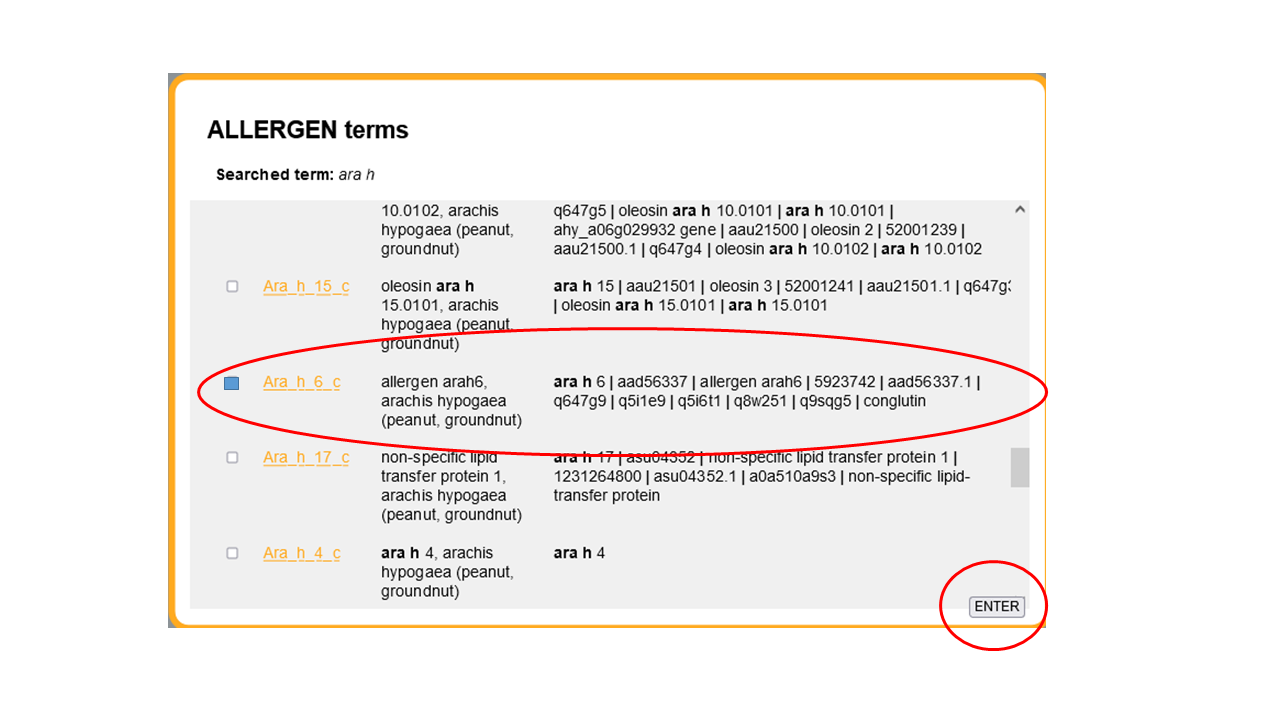
This tutorial is intended to make you familiar with the main features of the server. We are going to start by retrieving the symptoms and pathological terms associated to a given allergen. In this case, we are going to look for one of the main peanut allergens, Ara h 6 (conglutin). We use the “ALLERGEN terms” box to search for allergens. In this box, we can search by allergen ID, name (including synonyms), protein/gene name or source species (scientific and common name). In this case, we start typing, for example the allergen ID (Figure 1) and press [Enter] to obtain a list of the allergens matching the string typed so far (Figure 2). This list includes all data associated to the allergens (name, species, etc.). The allergen IDs in this list are active links to the original allergen database that can be followed to obtain additional info on the allergen. Only links to WHO/UIUIS database are functional. We locate the allergen we are interested in and select the corresponding checkbox (Figure 2). We could select more than one allergen in this list in order to retrieve symptoms for all of them (e.g. all “Ara h *” allergens). After selecting the allergen(s) we are interested in, we press the [ENTER] button (Figure 2).
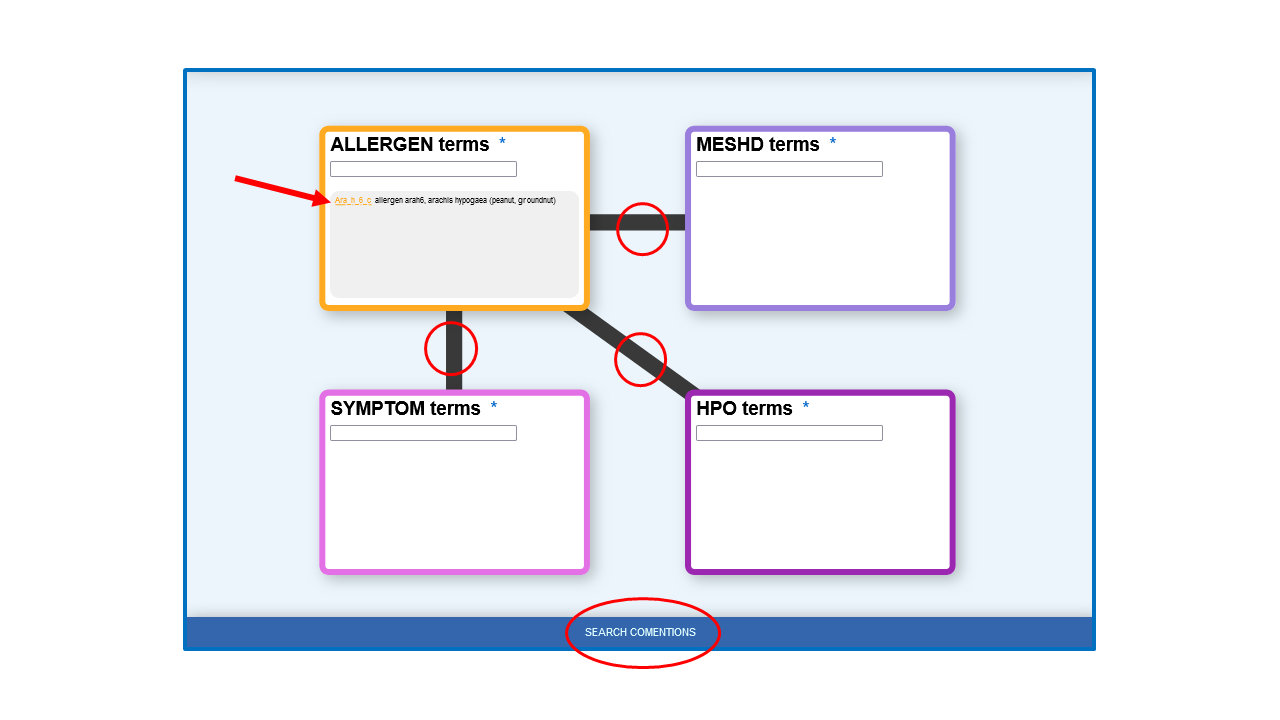
The selected allergen is shown in the “ALLERGEN terms” box (Figure 3). Next, we select the lines connecting this “ALLERGEN terms” box with the categories for which we want to retrieve relationships. In this case we select the three categories of pathological terms (HPO, MESHD and SYMPTOM terms) (Figure 3). Finally, we press “SEARCH COMENTIONS”.
A table with all relationships between our selected allergen and the pathological terms of the selected categories shows up. The top of this table is shown in Figure 4.
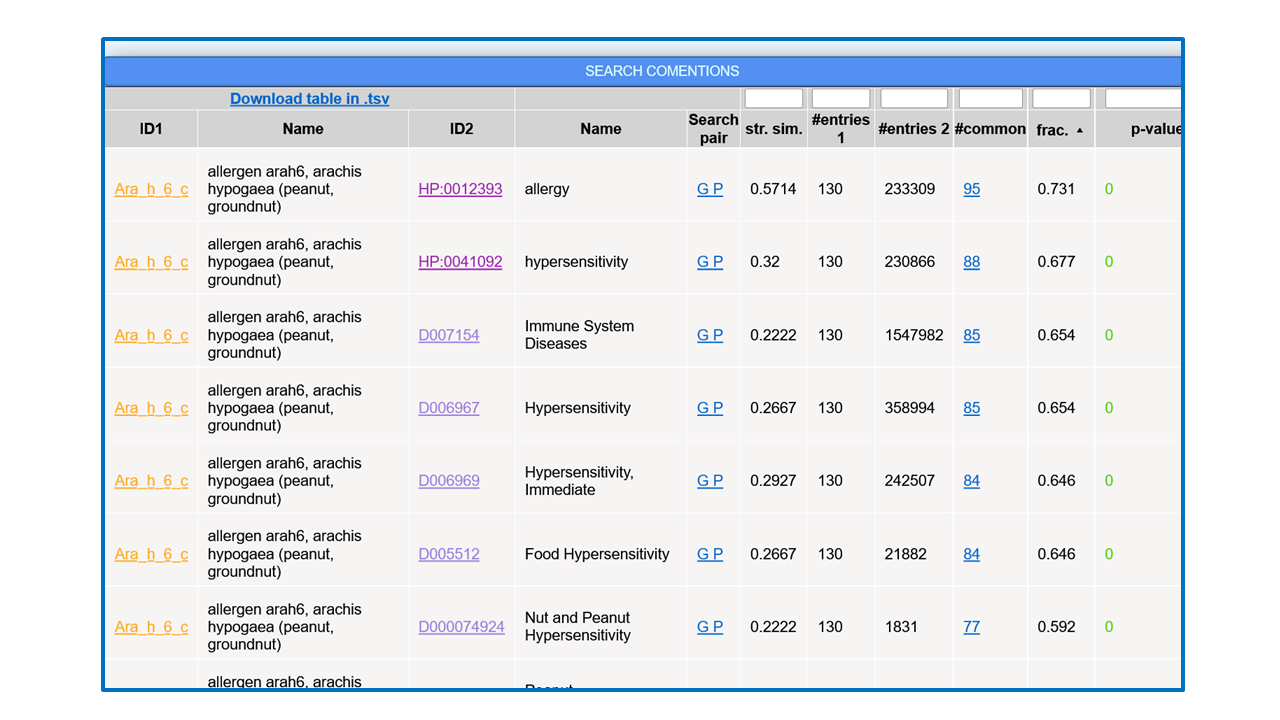
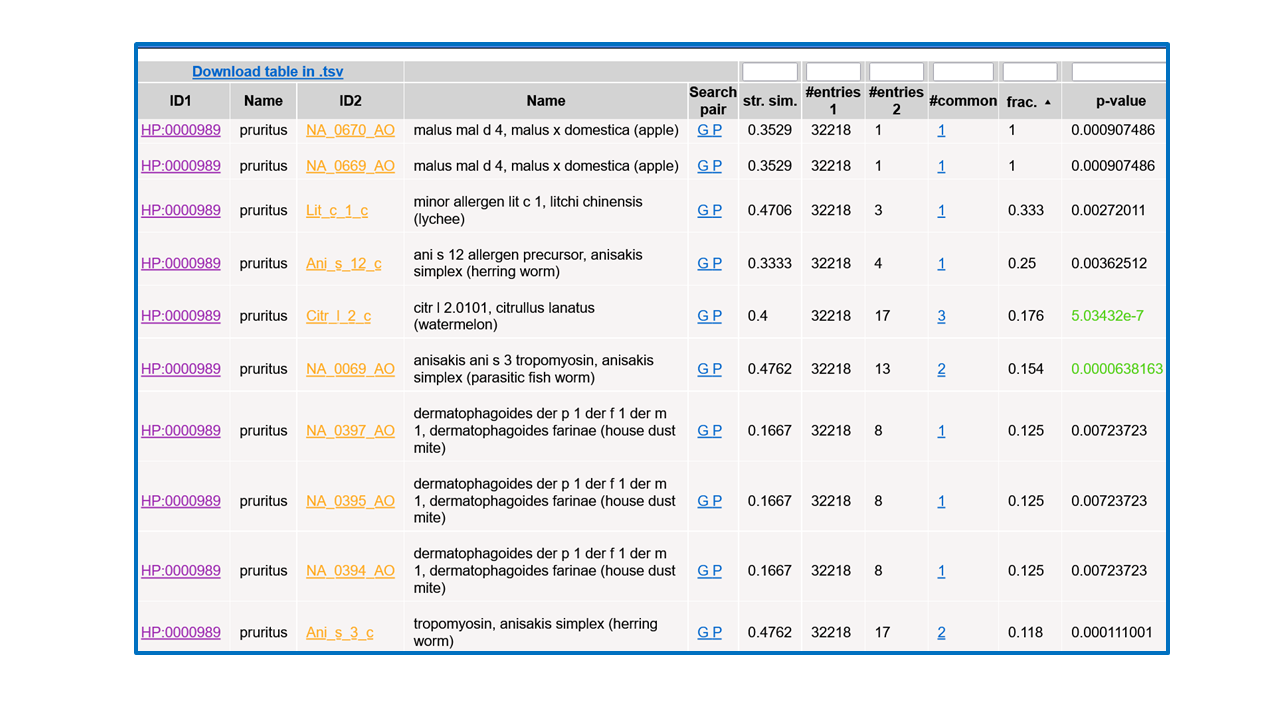
For each item in the list (pair allergen–pathological term), the IDs and names of both terms are shown, being the firsts links to the entries for these terms in the corresponding resources. These links can be followed to retrieve additional information on these terms in the original databases. The “Search pair” column contains links for performing text searches of both names together (without synonyms) in Google (“G”) and PubMed (“P”) in order to further investigate on the relationship. The “string similarity” between both names (including their synonyms, not shown in that table) is also shown and cases of high similarity (≥0.7) are highlighted in red color. This parameter is used to locate trivial co-mentions due to the textual similarity between terms. The next columns show the number of PubMed entries mentioning the allergen ("#entries 1"), those mentioning the pathological term ("#entries 2"), those mentioning both together ("#common"), and the ratio of these respect to the minimum of the first two ("frac."). The number of papers mentioning both terms is a link to the list of PubMed IDs of the articles where that co-mention was found, that can be followed to the corresponding abstracts. The last column ("p-value") shows the p-value of the hypergeometric test for assessing the significance of the co-mention (see reference above). Only pairs with p-value ≤ 0.01 are shown, and those with p-value ≤ 1·10-5 are highlighted in green color.
The table can be sorted by any column by clicking the corresponding header, and by default it is sorted by the ratio of papers mentioning both terms respect to the minimum of the papers mentioning each term individually. Sorting the table, it is possible, for example, to focus on the relationships with high values of a given parameter, those with best p-values or those involving terms of a given ontology (when more than one set of relationships were selected in the input form). The numerical columns have a text-box in the header that allows filtering the list of relationships to those with certain values of that parameter: less or equal the entered value for p-value and string similarity, and more or equal for the others. When a filter is applied, it is indicated in the column header. As the whole set of relationships matching the search criteria and filter is shown in a single table (i.e. without pagination) the browser’s “Search in page” functionality can be used to look for particular terms in long lists. Finally, there is a link to download the whole table in .TSV format in order to import it into an external spreadsheet program to further process it.
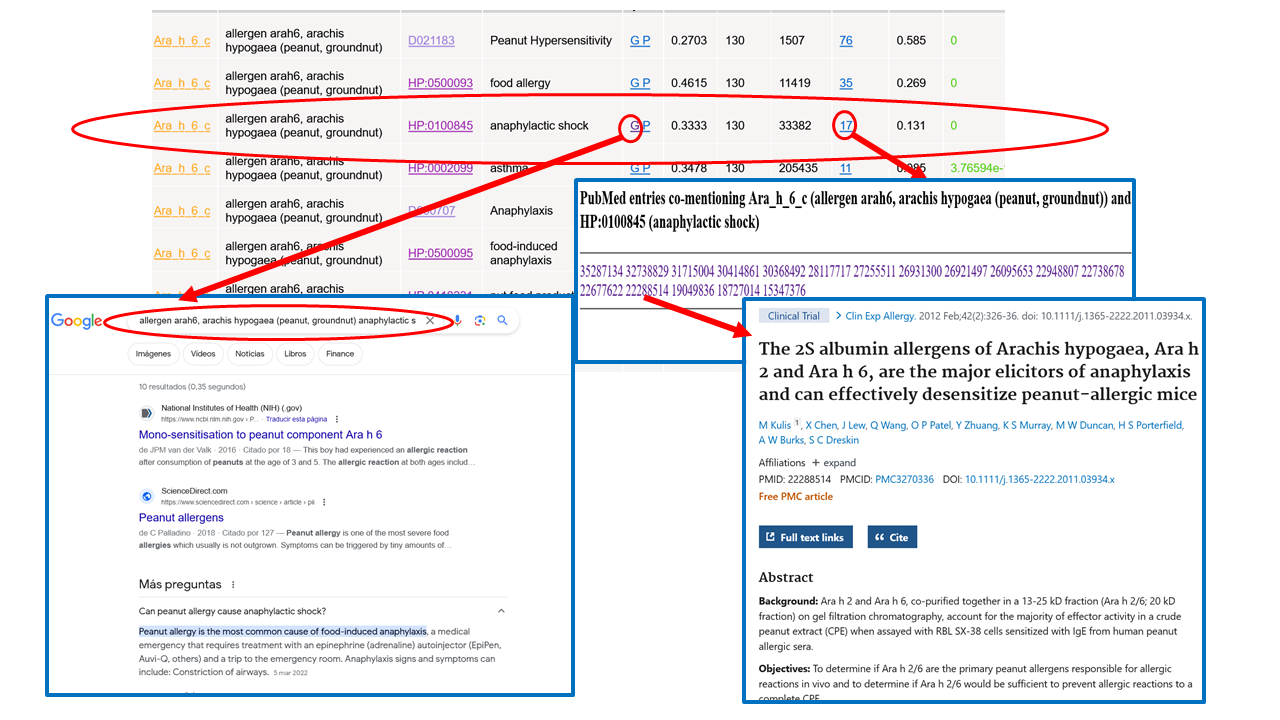
Let’s focus for example in the relationship between this Allergen (Ara h 6) and the symptom “anaphylactic shock” (HP:0100845) (Figure 5). The sets of 130 PubMed articles mentioning Ara h 6 and ~33,000 articles mentioning “anaphylactic shock” have 17 items in common, which is considered highly significant by the statistical test used (p-val=0). Following the “G” link for this relationship a Google search for the two terms together shows up, in whose results it is possible to further investigate in that relationship (Figure 5). It is also possible to retrieve that list of 17 articles mentioning the two terms together and take a look at their PubMed entries in order to get more details on the relationship (Figure 5). Note that these articles are retrieved based on the terms and all their synonyms, and hence they might not contain the main names of the terms shown in the table but some synonyms.
The interface can also be used for retrieving all allergens associated to a given symptom or pathological term. For example, let’s look for allergens causing the symptom (HPO term) “itching”. We do the same as before but using the “HPO terms” search box, and selecting the line corresponding to the relationships between HPOs and ALLERGENs (Figure 6). Note that the main name for that symptom in HPO is “pruritus”, being “itching” one of the synonyms.
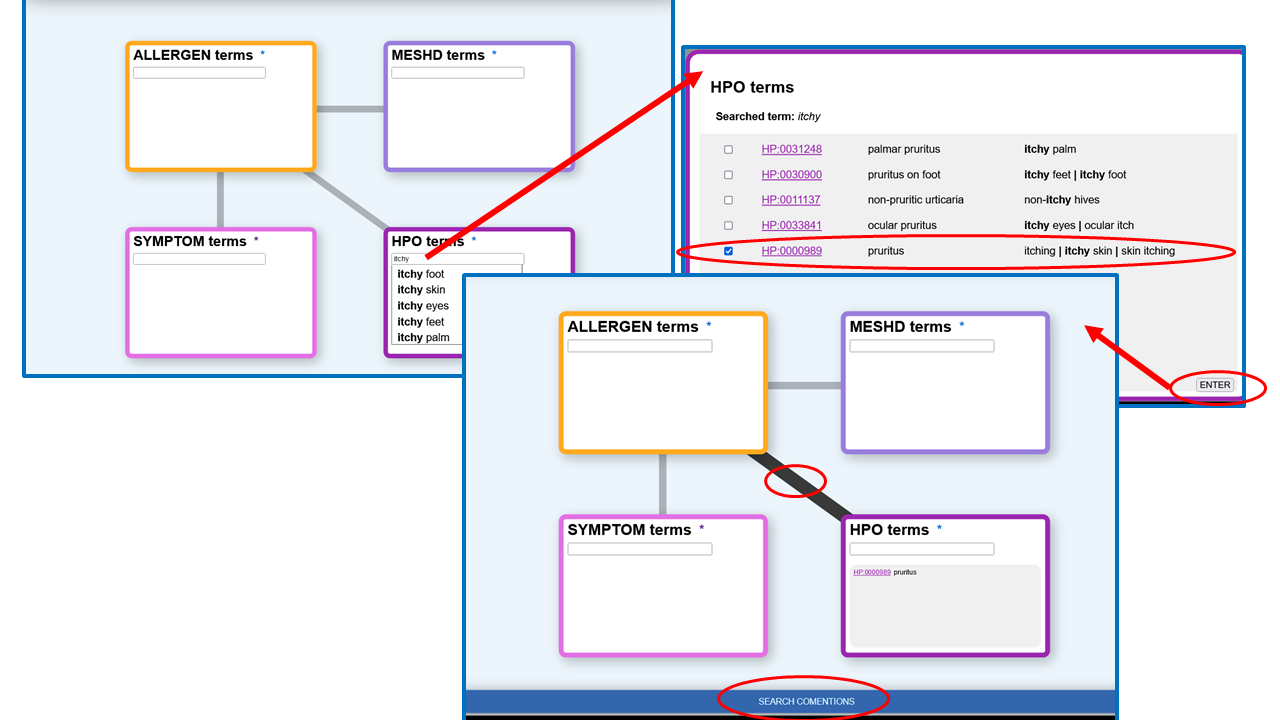
After pressing “SEARCH COMENTIONS” we obtain the list of allergens associated to that symptom, whose top is shown in Figure 7.